Dokploy: Why I Installed It on My VPS
One VPS, live links for real work. That is the portfolio.
In the past few months I really got into a development flow thanks to Dreams of Code. Just watching Go, making API servers, following along, breaking things, fixing them again.
Then I got asked to build a project. Who would have known the very same things I had been watching and learning were exactly what they asked from me.
So I said yes and got to work. But I quickly ran into an issue…
I could build it. I could not show it. Screenshots lie. Localhost does not count. I needed a live link with frontend, API and database all up at once. The more I built with AI help, the worse this got. More output, nowhere to put it.
That is what sent me back to his videos. In the first one he breaks up with his old Docker Stack workflow. Fine for simple setups, tedious once you run several apps. What he missed most was preview deployments, a live build of every pull request. Essential for humans, even better for AI agents whose changes you want to click before you merge. He speed dated three open source options. Dokploy was love at first sight, the best platform as a service UI he had used, giving Vercel a run for its money except you host it yourself. Then came the Coolify vs Dokploy follow up. I watched them like cup finals. That is how I ended up using Dokploy.
What Dokploy Actually Is
Both Dokploy and Coolify are platforms as a service you host yourself. Think Heroku, except you own the box. You get deploys from git, TLS, logs, metrics and databases without hand running web servers and certificates.
I have never touched Vercel in my life. No account, no deploy. I just knew I did not want per seat pricing for side projects that should cost pennies.
Here’s the thing. I already had a VPS. Cheap, idle, full of guilt. What I did not have was patience for another web server plus certificate plus process manager funeral at 1am.
Dokploy filled that gap. Docker underneath, Traefik on the edge for routing and TLS, one dashboard for the lot. The boxes it ticks are the ones beginners feel first:
- automatic deploys whenever you push to git
- application and server monitoring in the same UI
- automatic HTTPS plus secrets management
- preview deployments for every pull request, with status posted back on the PR
- bring your own VPS, the software itself free, plus Docker Compose support when one container stops being enough
Why Beginners Get Stuck
Most beginners hit the same wall. Tutorials end at localhost. Then someone asks for a demo and you have nothing to send.
Static hosts are brilliant for pages. They cant remember anything. No long lived process. No persistent disk. No safe place for secrets. The moment your project needs login, uploads, rate limits or a database, static says no.
Raw VPS fixes that and adds new pain. SSH in, install runtimes, open ports, configure a reverse proxy, issue certificates, renew them, read logs in six places. It works until you go on holiday.
Dokploy keeps the VPS and removes the chores. That is why it is a good first platform.
What One Box Can Hold
My VPS is not a single app server. It is a shelf for finished work:
- a full stack client build, frontend plus API plus database, on live URLs
- a small API for this blog, same pattern in miniature
- analytics for my own page views
- an uptime monitor that pings everything and tells me first
- photo backup plus supporting services, life admin next to client work
To be fair, any VPS can run this with enough shell scripts. Dokploy means I actually maintain it. Redeploy button, env editor, live logs. Done.
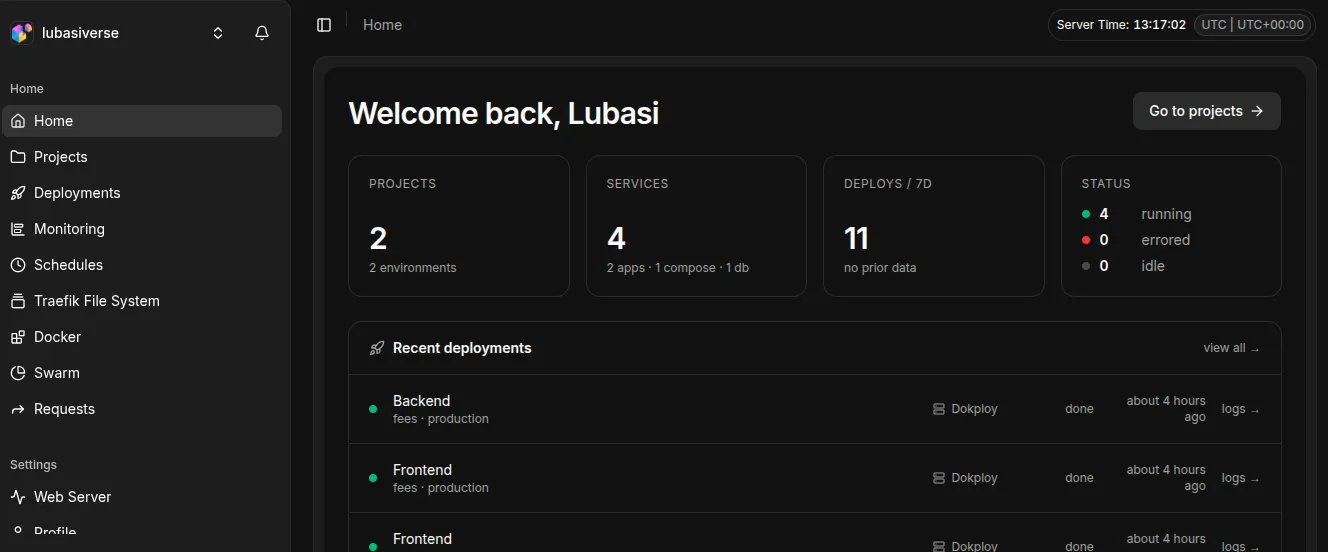
Showing Work: One Project, Live
A typical beginner project has three parts that have to agree:
- frontend, a static build served live
- API, a small service with real routes
- database, managed Postgres with a volume so redeploys keep data
In Dokploy that is three services in one project on one shared network. Each gets a domain with automatic TLS and env vars in the UI. Push to git, hit deploy, send the link. Someone clicks, it loads. That moment is the portfolio.
However, as it turns out, the boring bits decide if it stays up. Volumes for every database. A health endpoint so the platform knows green from dead. DNS pointed at the VPS before you blame the deploy. His demo app is a revamped Guestbook with login, usernames, replies and moderation, backed by Postgres with backups to S3 compatible storage. Migrations run on start so the schema follows the code.
A minimal service looks like this. Example only, not my config:
FROM oven/bun:1-slim
WORKDIR /app
COPY . .
CMD ["bun", "server.ts"]
Build it, give it a domain, add env vars in the dashboard:
# example only
APP_ENV=production
PORT=3000
Let me be direct. Start small. One volume for state. One health check. One domain per service. I did not need queues. I needed a box that remembers things whilst the platform handles the rest.
Why Dokploy Stuck
Features are easy to list. What convinced me was the shift in how I work. Five things, in the order they mattered.
1. It does not hide the plumbing
Dokploy sits on Docker and Traefik. It does not replace them. docker ps and docker logs still work on the box, in the same shell, with the same output you learned from tutorials.
That matters more than any feature. Everything you learn here is portable. When the dashboard confuses me, I drop to the shell and it is just containers. The artefacts stay standard too: a Dockerfile or a compose file, env vars, a volume. Worst case, I copy those onto another box and start again.
Compare that to platforms where leaving means rewriting your deploy. Here the exit ramp is a text file I already own.
2. The safe default is the default
One project groups your services onto one private network. They find each other by internal hostnames, so the database never needs a public port.
Beginners get this wrong constantly. Postgres on a public port, a weak password, one bad day. Dokploy hands you the internal network first and makes exposing a port a deliberate choice. It is the kind of default that saves you at 2am, three months in, when you still have not thought about it.
3. Idle is the bill you actually pay
My box has 2 vCPU and about 11 GB of RAM. Right now it runs 14 containers at load 0.02, roughly 7 percent CPU spread across all of them, about 4.5 GB of memory used, up 11 days. Two of those containers do most of the work.
Peak lasts seconds. Idle lasts months. That is why a cheap VPS holds far more than beginners expect, and why the platform’s own overhead matters: whatever it burns, it burns every hour of every day.
4. Preview deployments change the review loop
Every pull request gets its own live URL, with build logs and the status posted back on the PR. You click the change instead of reading a diff.
This is the one I did not know I needed. When an agent writes the code, or a teammate does, you get to use it before you merge it. Open a PR, share the preview link, get a yes, merge, and main deploys itself.
5. The boring insurance is a form, not a project
Scheduled backups on the database service to off box storage. Health checks per service. Redeploy or roll back from the UI.
Left to myself, I postpone all three. Beginners skip them entirely, then learn about backups the hard way. Here they are a few fields in the same dashboard I already have open, so they actually happen.
Honest rough edges from his walkthrough. The server picker reads badly when you have no remote servers, and the GitHub connect step hides behind a small install icon. Both cost minutes once.
What I gave up is worth saying too. You are the SRE now. You own the disk, the updates and the restore. If the box dies, your backups decide whether that is an afternoon or a funeral. For me that trade is fine, and cheap, because the whole thing is one CLI command away from being rebuilt.
Dreams of Code ran the fair head to head against Coolify on identical hardware. That comparison is linked in Resources if you want the numbers side by side. For my box, this was the calmer choice.
Start Here If You Are New
Pick one VPS, install Dokploy, ship one frontend plus one API plus one database. Add a monitor second. Back up volumes third. Total maintenance is checking backups exist and ignoring the rest. Boring. Beautiful. Yours.
PS. Screenshots are claims. Live links are proof. Put the work somewhere it can be clicked.
If you are learning Go and APIs right now, this is the shelf for that work. One box, many links, no serverless bill.
Resources
- Dreams of Code Dokploy setup, Docker Stack to Dokploy, Guestbook plus Postgres plus preview deploys
- Dreams of Code comparison
- His video walkthrough
- Dokploy docs